
© 2026 Saad Web Designer | All Rights Reserved


Brooklyn, NYC
How to Plan a Website Sitemap for a Small Business
Your small business website should facilitate well for the visitors to find information about your services and take action. Making a sitemap beforehand will help you have a plan for the pages before development interruption, reducing confusion and making it easy to navigate. With website sitemap planning business owners also get clear visibility on the content required, how pages link together and what information is important over others.
It does not require dozens of pages (and a complex diagram) to start with. A simple structure that mirrors where you want your business to go (and what your customers need you to do) is all but sufficient. The main part is to be prepared for the primary sections of the website, which related data would remain together and suppose you want to reach one significant section for another page follow a pathway.
What Is a Website Sitemap?
A website sitemap is a plan that shows the pages a website needs and how those pages relate to one another. It helps business owners, designers, and content writers understand the website's overall organization before individual pages are created.
For example, a local consulting business might have a homepage, an About page, separate service pages, a portfolio, a blog, and a Contact page. A sitemap shows how these sections fit together and which pages belong under each main category.
There are two common types of sitemaps:
Visual or HTML sitemap: A human-readable list or diagram that helps visitors or project teams understand the website's page structure.
XML sitemap: A file that lists important website URLs to help search engines discover pages they may need to crawl.
These serve different purposes. A visual sitemap helps with planning and navigation, while an XML sitemap supports search engine discovery. Google's Official Sitemap Documentation explains how search engines use sitemaps and when they may be helpful.
Why Website Sitemap Planning Matters for Small Businesses
And a sitemap works well here, because it allows you to consider the shape of your structure before design or development or writing all that content.
It Makes Navigation Easier
Users should not have to comb through many disconnected pages to get fundamental details. Organising in a way that groups related content and easier access to the key sections.
A cleaning company, for instance, can have its primary Services section divided into Residential Cleaning, Commercial and Move-Out Cleaning. They can then browse through the service best suited for them after having consistent data (not cluttered with unrelated content).
It Aids You in Prioritising Business Objectives
Every single page must serve a purpose containing information you are trying to convey. Part of them are pages that explain your services, and some of them help potential customers to establish contact or build trust.
Creating a sitemap helps to see what pages serve your primary purposes more clearly. Your service pages and Contact page should be easy to find if inquiries are your priority. If you are selling online, you have to plan the structure of your categories, product pages, and checkout.
It Reduces Unnecessary Development Work
A haphazard approach adds new pages without a strategy can create duplicate content, disorientate site menus and cause one-off design changes to pile up. Before any development begins, a sitemap helps everyone involved come to the same conclusion when planning your app.
It also aids in preventing you from making separate pages for content that is clearer with a parent page.
Step 1: Define Your Website's Main Goal
Start by deciding what the website should help your business achieve. Do not begin by listing every page you can think of. First, consider what visitors need to accomplish.
Common goals include:
● Generating inquiries or appointment bookings.
● Explaining services and business expertise.
● Selling products online.
● Showing previous work and client projects.
● Sharing useful information through a blog.
● Providing support to existing customers.
Your main goal influences the pages you need and the order in which visitors should encounter them.
For example, a small accounting firm may need service pages, information about its team, client resources, and a contact form. An online store will need product categories, individual product pages, shipping information, returns policies, and checkout functionality.
Step 2: Understand What Your Visitors Need
A website should reflect the questions customers ask, not just the way a business describes itself. Consider what people want to know before they contact you or purchase something.
Think about questions such as:
● What does the business offer?
● Who are its services suitable for?
● Where does it operate?
● What makes its approach different?
● How can customers request a quote?
● What information is needed before making a decision?
You can find useful clues in customer emails, sales conversations, frequently asked questions, and feedback. Search queries and competitor websites can also help you identify topics worth addressing, although your own website should have a structure suited to your business.
Step 3: List the Essential Website Pages
Create a list of the pages required to explain your business and support its goals. A small business does not need every possible page at launch.
A practical starting point is shown below.
| Page | Main purpose |
|---|---|
| Home | Introduce the business and guide visitors to key sections |
| About | Explain the company's background, team, and relevant experience |
| Services | Summarize the main services offered |
| Individual service pages | Explain specific services, processes, and customer benefits |
| Portfolio or case studies | Show relevant work and verifiable examples |
| Blog or resources | Answer customer questions and provide useful information |
| Contact | Provide contact details, a form, and other relevant ways to get in touch |
| Privacy policy | Explain relevant data collection and privacy practices |
Separate Pages That Need Different Content
A common planning mistake is placing every service on one long page, even when customers have different questions about each offering.
A single Services page may work for a business with two straightforward services. However, a company offering web design, website maintenance, and e-commerce development might benefit from separate pages if each service needs a distinct explanation.
Create a separate page when the subject requires enough unique information to justify it. Avoid splitting content simply to increase the page count.
Step 4: Organize Pages Into a Clear Hierarchy
After listing your pages, arrange them into logical groups. This is the foundation of your website information architecture: the way content is categorized, connected, and presented to visitors.
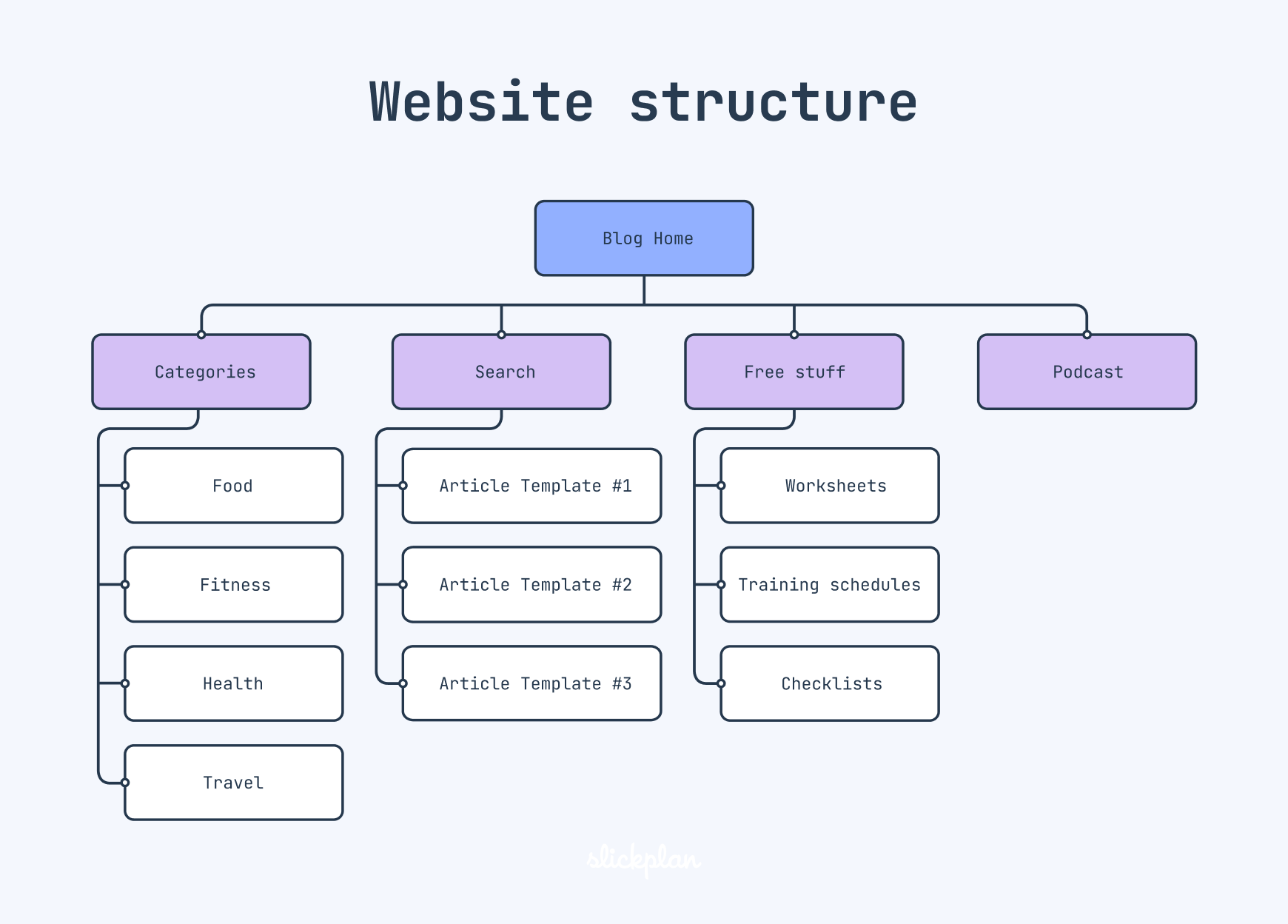
A basic structure might look like this:
Home
● About
● Services
Service One - Service Two - Service Three
Service One - Service Two - Service Three
● Portfolio
● Blog
Article One - Article Two
Article One - Article Two
● Contact
This arrangement shows which pages are main sections and which belong within a larger category.
Keep Important Information Accessible
Your homepage should link to the sections visitors are most likely to need. Main navigation should remain focused on the most important areas instead of displaying every page.
For many small websites, a straightforward top-level menu is sufficient. Deeper levels can be useful when a business has several distinct categories, but excessive nesting makes information harder to locate.
Google's SEO Starter Guide also recommends organizing websites logically and using descriptive URLs so people and search engines can better understand the content.
Step 5: Plan Internal Links Between Pages
A sitemap shows the planned structure, but visitors also need links that help them move naturally between related pages.
For example, a service page could link to a relevant portfolio project, a frequently asked question, or the Contact page. A blog post explaining a common business problem could link to a service page when that service genuinely helps address the problem.
These links create useful connections between information.
When reviewing your structure, ask:
● Can visitors reach the main services from the homepage?
● Can they find supporting information without returning to the menu?
● Are related blog posts connected to relevant service pages?
● Can someone who is ready to make an inquiry find the Contact page easily?
Step 6: Consider Search Engines Without Overcomplicating the Structure
Good website structure can support search engine discovery, but a sitemap alone does not guarantee rankings or indexing. Search engines also rely on links, page accessibility, content quality, and other signals.
Start with these practical considerations:
● Give each important page a clear, descriptive title.
● Use URLs that are understandable and consistent.
● Link important pages from relevant sections of the website.
● Avoid creating several pages that target the same need with nearly identical content.
● Make sure important content can be accessed by visitors and search engine crawlers.
When Do You Need an XML Sitemap?
A small website with well-connected pages may not need a separate XML sitemap immediately. Google notes that websites with around 500 or fewer pages may not need one if their important pages are already linked internally and they have limited media or news content.
However, an XML sitemap can still be helpful for a new website, a site with pages that are difficult to discover through links, or a website with substantial media content.
If your content management system generates an XML sitemap automatically, check that it includes the appropriate URLs. Google's Guide to Building and Submitting a Sitemap explains the supported formats and submission process.
Remember that submitting a sitemap is a discovery aid, not a promise that every listed page will be crawled or indexed.
Step 7: Check the Structure Before Development
Once the sitemap is drafted, review it from the perspective of someone visiting your website for the first time.
Imagine a potential customer who wants to learn about a particular service, compare your experience, and contact you. Can they complete those tasks without guessing where information is located?
Review each proposed page for purpose, overlap, and placement. Remove unnecessary sections and move misplaced content to a more relevant category.
A Simple Example for a Local Service Business
Imagine a small business that provides website design and maintenance. Its initial sitemap might include:
● Home
● About
● Website Maintenance
● Portfolio
● Blog
● Contact
● Website Design
Small Business Websites - E-commerce Websites
Small Business Websites - E-commerce Websites
This structure gives each major service a clear place while allowing supporting content to remain connected. The business can start with the essential pages and add more only when new services or customer needs justify them.
If you need help turning this outline into a working website, you can explore a Web Designer in New York as a relevant resource for website planning and development.
Step 8: Review and Update Your Sitemap Over Time
A sitemap should reflect the website as it exists and the needs of the business as they change. New services, customer questions, and content opportunities may require adjustments.
Review the structure whenever you introduce a significant service, redesign your navigation, or notice that visitors struggle to find important information.
Website analytics, customer inquiries, and feedback can help identify pages that need clearer links or better organization. Before removing an existing page, check whether it receives useful traffic or has links pointing to it. Plan appropriate redirects when URLs change so visitors are less likely to encounter broken links.
The goal is not to keep expanding the sitemap. It is to keep the structure useful, understandable, and aligned with the business.
Common Website Sitemap Planning Mistakes
Small businesses can avoid several problems by reviewing their sitemap before development.
Creating too many pages: Every page adds content and maintenance work. Include pages that serve a clear purpose.
Using vague labels: Names such as “More” or “Other” do not explain what visitors will find.
Hiding important services: Keep your main offerings accessible through clear navigation.
Ignoring mobile navigation: Check that menus and page relationships remain easy to use on smaller screens.
Treating the sitemap as an SEO shortcut: A sitemap supports organization and discovery, but it cannot replace useful content and accessible navigation.
Saad Web Designer NYC is an experienced web designer in New York who can turn audit findings into actionable improvements. Instead of simply highlighting problems, he helps optimize your site for better rankings, stronger local visibility, and higher conversions.
For businesses targeting Manhattan, Brooklyn, Queens, the Bronx, and Staten Island, professional guidance can make the difference between being found by local customers and getting lost among competitors. So, contact him right now to create a high-performing website design for NYC small business!
Conclusion
Effective website sitemap planning starts with a clear business goal, an understanding of customer needs, and a practical list of essential pages. Group related content logically, make important sections easy to reach, and connect pages with useful internal links.
For a small business, the best structure is not necessarily the biggest one. It is the one that helps visitors find relevant information and understand their next step. Build the initial sitemap around real needs, review it before development, and update it as the business grows.
FAQ's
How many pages should a small business website have?
+What is the difference between a visual sitemap and an XML sitemap?
+When should I update my website sitemap?
+Does every small business website need an XML sitemap?
+